
HighLevel
Connect Referral Rock with HighLevel to add converted referrals as new members, or create promotional links to use in HighLevel emails
This integration is not currently available.
Overview
HighLevel is an email marketing, marketing automation, and CRM platform.
Connect HighLevel with Referral Rock to:
- Route new referrals into HighLevel — create a Contact and set the stage
- Use Customer Feed — when an pportunity is won, matching referrals are Approved across all programs and the account's contacts can be preloaded as members
- Promote your program through HighLevel email campaigns by adding access links
Customer Feed
Our native Customer Feed capability directly tracks referrals who convert via HighLevel, and preloads these customers as members.
How it works (trigger + objects)
Customer Feed trigger: Opportunity reaches Won (or a stage you define). Objects: Opportunity, Contact
Referral Routing: new referral → HighLevel Contact + pipeline stage.
Two-way.
Setup (auth)
Connect HighLevel over OAuth.
Promote Sharing from Email Campaigns
Common use cases for sharing with email campaigns:
- Launch your referral program with a mass email campaign
- Add links directly to footers of all emails for awareness of your program
- Build ongoing invite campaigns for new customers
Our links make it easy for any email recipient to share with their friends. With one click, the recipient instantly gets into their Member Portal to start sharing. No passwords or registration required!
Step 1: Build your Link
Click the button below to create a link for use in HighLevel emails.
Step 2: Add Link to Email Templates
Adding your program's access link to email templates is a great way to maintain awareness of your program. Not everyone joins right away, but knowing your referral program exists helps remind people to share.
Step 3: Add Link to your Email Campaign
- Create an email campaign in HighLevel
- Place the access link as the call-to-action for joining your referral program
- Send yourself a test email to verify the link works correctly
- Send your email campaign to launch your referral program
Legacy Referral Add/Referral Update (via Zapier)
While we recommend using our Customer Feed capabilities, you can also connect HighLevel with Zapier to add and update referrals.
Connect your HighLevel account with Referral Rock using Zapier in order to:
- Add new referrals from HighLevel
- Update referrals
- Add new HighLevel contacts from new referrals
- To add your Referral Rock account to Zapier, you will need Public and Private API Keys. You can create them here.
- You will also need them for one of the steps in the Add Referrals Zap.
- To add your HighLevel account to Zapier, you will need an API Key, which you can copy from your HighLevel Business Profile Settings → General Information → API Key.
Add Contacts
Watch the video below to learn how to add new referrals to HighLevel contacts with Zapier.
Add Referrals
Watch the video below to learn how to add new HighLevel contacts to Referral Rock referrals with Zapier.
The '2. GET' step isn't necessary if you already save the referral code in the contact or opportunity object. In this case, ensure the 'Filter conditions' step checks the correct member code field, then select the correct referral code in the 'Add Referral' step.
If you plan to add referrals from a future opportunity stage in a specific referral status, you'll need to add one more step to the Zap. In this step, use the Referral Rock app and the 'Update Referral' Action event.
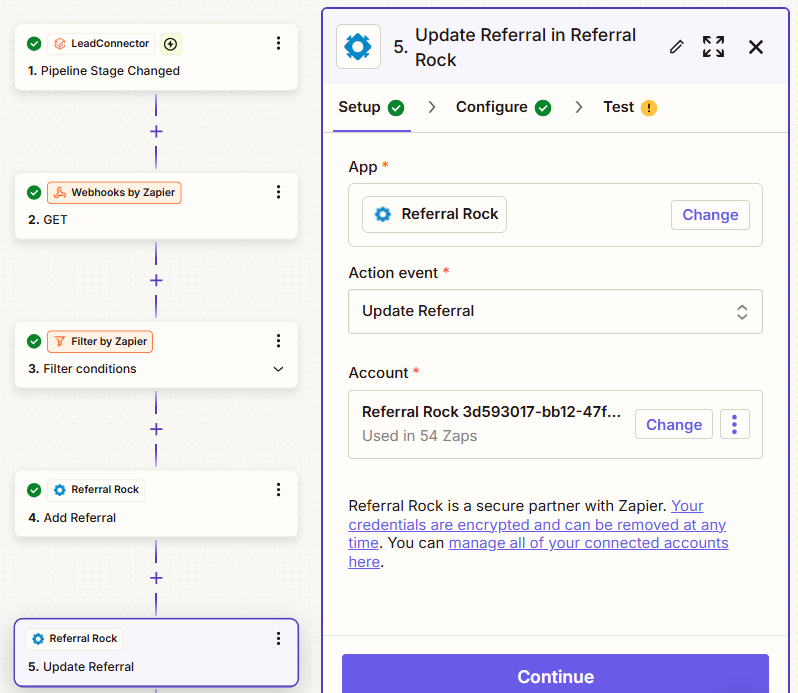
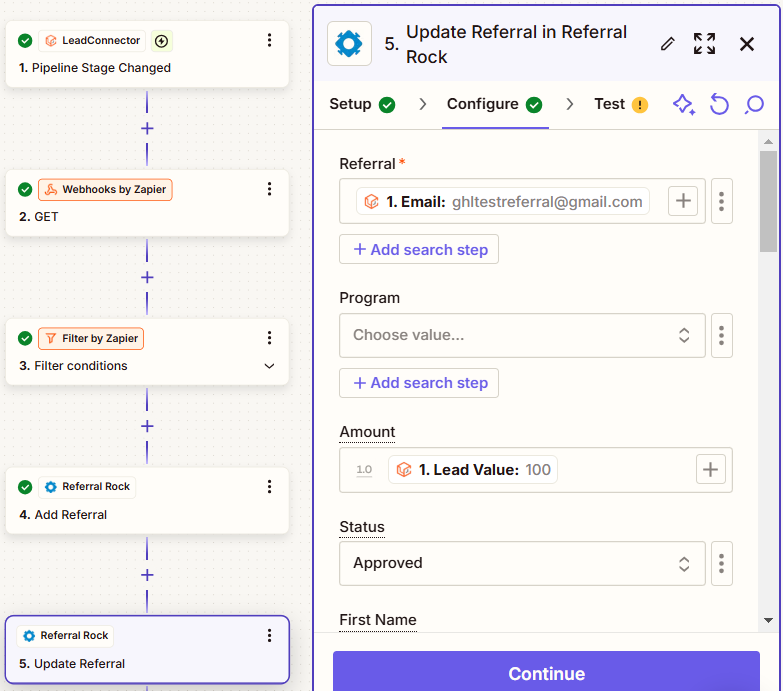
Then, add the referral email address and select the status. If the + icon doesn’t appear in the Referral input field, click the three dots next to it, select 'Custom', and it should appear.
Update Referrals
Watch the video below to learn how to update the referral status from HighLevel updates.
Updated 2 days ago