
Customer Feed
Approve referrals and add them as members when an order is paid or deal is won
What it is
Connect a system of record (billing tool or CRM). When a matching paid order or won deal occurs, the matching referral is set to Approved across all programs and the buyer can be preloaded as a member per account settings.
How it works
Trigger → match → approve across all programs → optional member preload.
Two-way for CRMs; one-way read for billing/e-commerce.
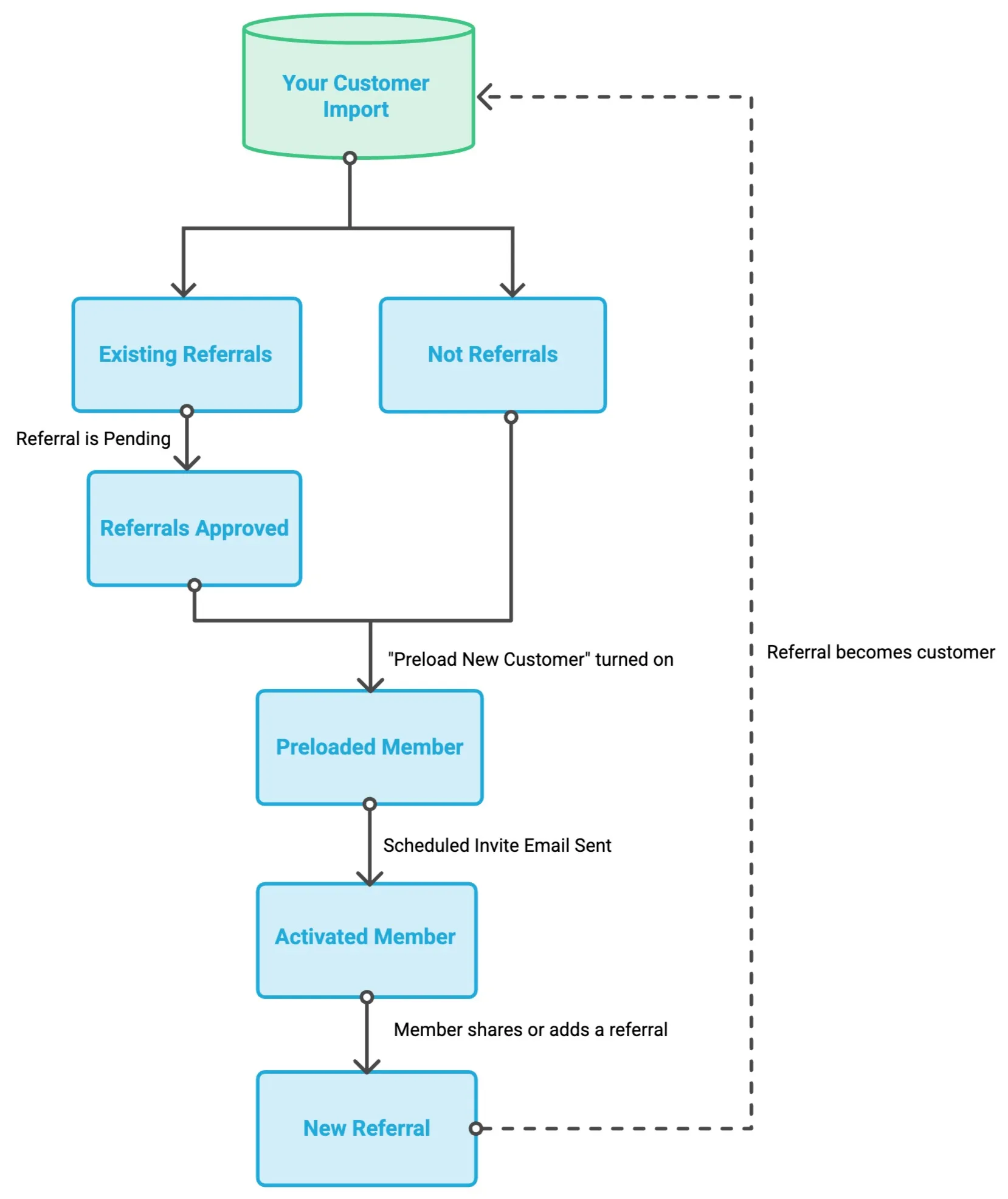
Customer Feed reads your list of recent customers from your record system, and will allow you to automatically:
- Approve referrals and trigger associated rewards (if customer is an existing referral)
- Update qualified referrals automatically, keeping referral status in step with your CRM without manual edits.
- Add customers as preloaded members (ready to be invited)
- Send Invite Emails (according to Invite Scheduler)
- Follow up based on program engagement
It is designed to run again and again without worrying about duplicate records or adding someone by mistake.
- If an email already belongs to a member, nothing changes (no duplicates)
- Only approves eligible referrals (referrals already approved or denied stay as they are)
- Email matching more than one referral is skipped
- Import history shows you a summary of what was added, approved, and skipped
Supported systems
CSV upload method
Customer Feed can also be fed by uploading a CSV (of paid orders / won deals / customers) as a manual alternative to a live connection — same result: matching referrals set to Approved across all programs + optional member preload.
Good for one-time backfills, systems without a native connection, or teams without API access.
Customer Feed vs. Conversion TrackingCustomer Feed is a system-of-record sync (no code, inbound events); Conversion Tracking is self-instrumented (Referral.js). These are two different capture paths.
Updated about 3 hours ago